Agents are getting faster. The work is not.
The bottleneck is state.
A developer can ask an agent to inspect a stack trace, draft a migration, write tests, open a pull request, or summarize a product decision. The model may move in seconds. The tool may be capable enough to touch the repo, the ticket system, and the docs.
But if the agent starts from the wrong state, speed just makes cleanup arrive sooner.
The human is still asked to remember what happened in the last chat, why the decision changed, which blocker is still open, where the source lives, and what should not be repeated. Claude has one slice. ChatGPT has another. Cursor or Codex has the repo. GitHub has review history. Slack has the caveats. Linear or Jira has status. A meeting has the sentence everyone remembers differently.
The agent can move quickly only after it knows what matters.
Software teams already learned this lesson in another domain. Continuous integration made code changes safer by turning integration into a repeatable pipeline. As Martin Fowler describes it, each integration is verified by an automated build and test so errors surface quickly. CI did not make engineers perfect. It made quality less dependent on memory, timing, and local discipline.
AI-native work needs the same shift for context.
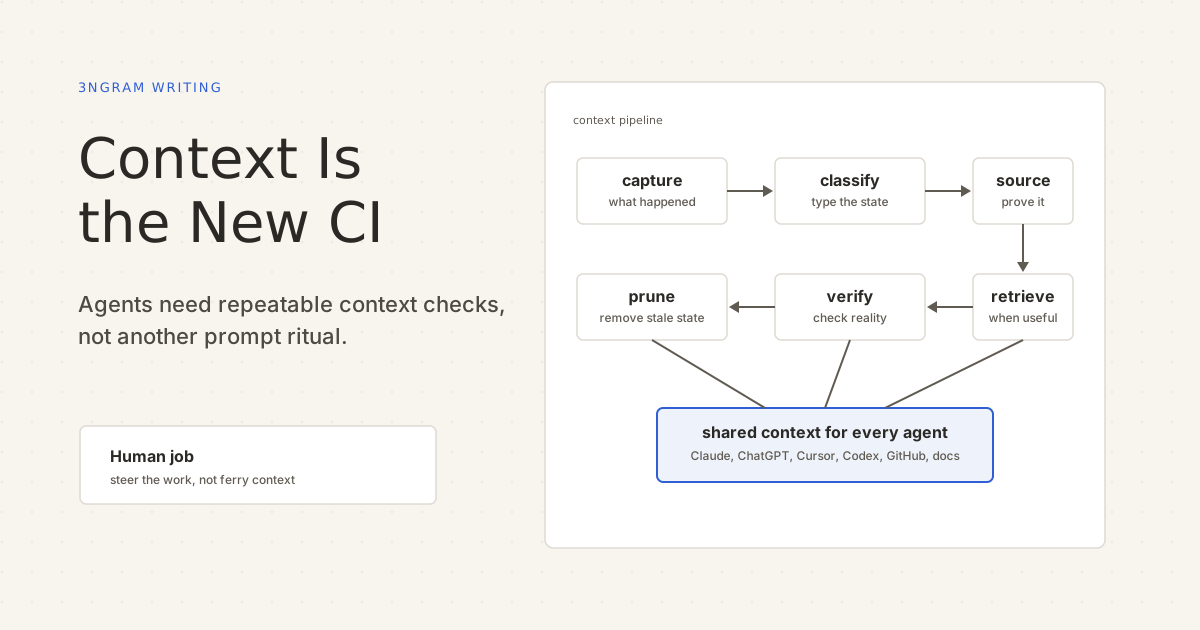
Not bigger prompts. Not one giant transcript. Not another dashboard people have to remember to check. A context pipeline: capture, classify, source, retrieve, verify, and prune the work state that agents depend on.
The Failures Are Already Visible
Most teams do not have a context shortage. They have context everywhere.
That is the problem.
A project doc is useful at first, but nobody updates it after implementation changes. The agent reads it and follows old instructions.
A founder explains the same company context to ChatGPT, Claude, and a coding agent, then forgets which one has the latest rationale.
A product decision lives in Slack, the implementation lives in GitHub, the follow-up lives in email, and the next AI session sees only one of them.
A coding agent repeats a bad assumption because the correction happened in yesterday’s transcript, not in shared context.
A long-running task fails because the model has the initial plan but not the later blocker.
These are not model capability failures in the narrow sense. They are continuity failures. The system did not make the relevant work state repeatable.
Take a normal workplace example. A customer rollout is blocked because procurement needs a signed DPA. Legal changes the fallback clause. Product decides the first release will be opt-in for the German team only. Engineering ships the feature behind a flag. Customer success needs release notes that say what is available now, what is waiting on procurement, and what changed since the last call.
That work crosses email, contracts, meeting notes, Slack, GitHub, the CRM, and the release doc. If the next agent sees only the product brief, it may draft confident release notes that ignore the DPA. If it sees only the legal thread, it may miss the feature flag. If it sees only the PR, it may announce a rollout that procurement has not cleared.
The issue is not that the team forgot to write anything down. The issue is that the work state never became a pipeline input.
Why Bigger Context Windows Do Not Solve It
The tempting answer is to paste more.
That helps until it does not. Long context is still a finite resource, and more tokens do not automatically mean better use of state. The Lost in the Middle paper found that models can perform worse when relevant information sits in the middle of long inputs. The practical lesson is simple: dumping everything into the prompt is not the same as giving the agent the right context.
Anthropic makes a similar point in its guide to effective context engineering for AI agents: context is critical, but finite, and the engineering problem is deciding what state is most likely to produce the desired behavior. The Model Context Protocol docs make the same point from the tooling side. The MCP Client Best Practices recommend progressive discovery when tool definitions start crowding the context window, so the model sees what it needs when it needs it.
That is the shape of the answer. Do not make the agent carry the whole company in its prompt. Give it a trusted way to get the current state for the job in front of it.
What A Context Pipeline Does
A context pipeline is the set of practices and systems that make work state available to humans and agents at the right moment.
It has six jobs.
1. Capture
Capture is the commit hook for context.
It catches the pieces of work that should survive the current surface: decisions, commitments, blockers, rationale, source links, preferences, constraints, and working patterns. Not every sentence deserves persistence. Raw transcripts are source material, not the operating layer.
In the rollout example, capture should happen when the DPA blocker appears, when Legal changes the fallback clause, when Product decides on an opt-in German launch, and when Engineering merges the feature flag. Waiting three days for someone to write a summary is like asking developers to run tests after they have forgotten what they changed.
Good capture asks: what did we learn, decide, promise, block on, or need to carry forward?
2. Classify
Classification turns text into work state. The same rollout produces three sentences that look alike in a chat log and behave nothing alike once typed:
Procurement needs a signed DPA before the German rollout
Launch to the German team as opt-in first
Send release notes after Legal confirms the fallback clause
Those objects should not behave the same way. A decision needs rationale and source. A commitment needs owner and state. A blocker should keep surfacing until it clears. A preference should shape future output without becoming a task.
This is where flat memory falls short. If everything is stored as a note, the system has to rediscover meaning every time it retrieves the note. By then, it has lost the chance to manage lifecycle.
In CI terms, classification is the difference between a random file on disk and an artifact the pipeline knows how to handle.
3. Source
Context needs provenance.
If an agent says, “the rollout is blocked on the DPA,” the next question should be easy: where did that come from?
Source links let a human inspect the claim. They let an agent reopen the contract thread, GitHub issue, meeting note, PR, CRM update, or release doc that produced the context. They also create a path to correction when the source changes.
Without provenance, context becomes folklore. It may sound plausible, but nobody knows whether it came from a customer call, an outdated brief, a brainstorm, or a hallucinated summary.
CI keeps logs, commits, artifacts, and failing test output because a red build without a trail is just panic. Context needs the same trail.
4. Retrieve
Retrieval is not “search everything.”
Retrieval is choosing the smallest useful set of context for the task in front of the agent.
For release notes, that might be the active DPA blocker, the opt-in launch decision, the merged feature flag PR, the Legal source note, and the previous customer commitment. The agent does not need every Slack thread, every old product brief, and every transcript from the quarter.
This is the context version of checking out the right revision and dependencies before a build. The pipeline should supply the state the task needs, not ask the agent to sift through the whole warehouse.
The test is blunt: can a fresh agent start useful work without the human pasting the same state again?
5. Verify
Verification is the test step.
Retrieved context should be checked against reality before it becomes an instruction. The DPA blocker may have cleared. The feature flag may have been renamed. The release doc may have been updated after the meeting note. The customer commitment may now be overdue. A decision may have been reversed in a later call.
Verification can be lightweight. Check whether the linked issue is still open. Check whether the PR merged. Check whether the doc was updated after the context was captured. Ask the agent to cite the source before acting. Present uncertain state as “likely relevant” until confirmed.
The point is not to remove human judgement. It is to stop making humans do mechanical state reconstruction before they can exercise judgement.
6. Prune
Pruning keeps the pipeline trusted.
Context accumulates. Instructions overlap. Temporary constraints outlive their usefulness. Agent-generated summaries become confident but wrong. A pipeline that only captures and retrieves will eventually drown the agent in its own history.
Pruning asks what is stale, what has been superseded, what conflicts with a newer decision, what should be archived but not retrieved by default, and what needs a human correction.
CI has the same lesson. When tests are flaky, slow, or irrelevant, people stop trusting the build. When context is stale, people stop trusting the agent and return to manual prompting.
A Small Audit For This Week
Teams do not need to rebuild their whole stack to start improving this.
Pick one workflow that crosses at least two surfaces: a customer follow-up, a procurement blocker, a bug fix, a release, or a planning decision.
Then answer seven questions:
What work state mattered?
List the decisions, commitments, blockers, constraints, sources, and rationale that changed the next action.
Where did each piece of context live?
Was it in a chat, issue, PR, doc, Slack thread, meeting note, email, or someone's head?
Was it typed?
Could a system tell the difference between a decision, a commitment, a blocker, a fact, and a preference?
Was the source attached?
Could a human or agent inspect where the claim came from?
Could the next agent retrieve it without re-explanation?
Start a fresh session and see what you have to paste manually.
What would make it stale?
Identify the events that should change retrieval: issue closed, DPA signed, doc updated, deadline passed, decision reversed, branch merged, customer replied.
What should be pruned?
Find one old instruction, stale summary, or superseded decision that agents still might see.
This audit is small on purpose. The goal is not a perfect taxonomy. The goal is to expose where work state leaks.
The User Should Steer
The point of a context pipeline is not to create another management surface.
It is to make agentic work less dependent on the human carrying state between tools.
The human should decide what matters, correct the system when it is wrong, and steer the work. They should not have to remember which chat held the rationale, which provider saw the latest blocker, or which source system needs to be pasted again.
That is the practical frame for 3ngram. It is not another place to store notes. It is shared context for every AI and agent.
Claude, ChatGPT, Cursor, Codex, GitHub, docs, meetings, and work systems all produce fragments of the same work state. The useful layer is the one that captures the durable pieces, classifies them, keeps sources attached, retrieves them when relevant, verifies them against reality, and prunes what no longer belongs.
The user steers. The system carries state.
CI made code changes safer by making quality checks repeatable. Context infrastructure can make agentic work safer by making work state repeatable.
The old way is faster prompting on top of forgotten state.
The new way is shared context that lets every agent start where the work actually is.